 Billing InformationBilling Information

The Billing Information form provides a place for you to select a payment plan, down payment method, and enter other payment information.
Payment flexibility is an important benefit that comes along with an American Modern policy. Options include a single annual (Full) payment, 4 Pay, or 10 Pay plans. For added convenience, credit card payment or Electronic Funds Transfer can also be utilized, with modernLINK either authorizing and charging the credit card number or verifying the Bank ABA and Bank Account numbers.
You can change a payment plan at any time, but American Modern recommends changing a payment plan on the policy's effective date (not mid-term) when possible.
Please see the FAQ for Billing for more information about collecting and handling payments.
 |
Some states may not allow the use of credit information to decline an applicant. In these states, we ask that the risk be underwritten very thoroughly to ensure the risk is acceptable. Insurance credit scores will only be used as part of the underwriting evaluation in states that allow the use of credit information for acceptability of a risk. |
Billing Information includes:
|
Field |
Description |
|
Policy Term |
Indicates the policy term in months, carried over from Eligible Programs information. To change this value, return to the Eligible Programs page. |
|
Agent Billing Option |
Indicates the Agent Billing Option, carried over from the Client page. To change this value, return to the Client page. |
|
Payment Plan |
Payment choices include: Full Pay. Full payment is made immediately. Client or lienholder is billed for the total. 4 Pay. 25% down with the balance paid in three installments. American Modern will include service charges applicable to the state. If the 4 Pay plan is elected, the entire premium will be billed in the first six months of the policy period. Note: This is NOT a quarterly pay plan. 10 Pay. 16.3% down with the balance paid in nine additional payments. American Modern will include service charges applicable to the state. EZPay (EFT)/Monthly. Electronic funds transfer from a checking account, savings account on the selected day of the month. An EZPay Authorization form should be signed by the applicant authorizing transfer of funds for the policy premium. This form should be kept in agent files. This option requires a minimum of two-twelfths down payment. The down payment amount is transferred immediately from the applicant's account. Remaining payments are withdrawn monthly on the day selected. modernLINK attempts to verify the account information through a third party service when either the Submit, Next, or Previous buttons are clicked. A $1 service charge for each withdrawal may apply. EZPay ( CC)/Monthly. EZPay (EFT)/Monthly. Electronic funds transfer from a credit card account on the selected day of the month. An EZPay Authorization form should be signed by the applicant authorizing transfer of funds for the policy premium. This form should be kept in agent files. This option requires a minimum of two-twelfths down payment. The down payment amount is transferred immediately from the applicant's account. Remaining payments are withdrawn monthly on the day selected. modernLINK attempts to verify the account information through a third party service when either the Submit, Next, or Previous buttons are clicked. A $1 service charge for each withdrawal may apply.
|
|
Minimum Down Payment |
Shows the minimum required down payment for the selected pay plan. This amount should be collected by the agent. |
|
Down Payment Method |
Down payment methods include: Bill the Down to Agent. The down payment bill for the policy is sent directly to the agent. For the Full Pay payment plan, this is 100 percent of the bill. Bill the Down to Lienholder. The bill for the policy is sent directly to the lienholder. For lienholder, this is 100 percent of the premium. Bill the Down to Sub-Producer. The down payment bill for the policy is sent directly to the sub-producer. For the Full Pay payment plan, this is 100 percent of the bill. Bill the Down to Client. The down payment bill for the policy is sent directly to the applicant. For the Full Pay payment plan, this is 100 percent of the bill. Credit Card. Charge the down payment to a credit card. For the Full Pay payment plan, this is 100 percent of the bill. Credit card authorization is performed when the Submit button is clicked. If the card is charged, a success message displays and the Reference Number and Authorization Code are displayed should you desire to record them for your records. Check or Money Order. If collected and EFT Down Payment is not selected, forward the check or money order with a printed application to American Modern. For the Full Pay payment plan, this is 100 percent of the bill. EFT Down Payment. Voided check and approval for EFT is received from applicant (do not use a bank account number from deposit slip). When the policy is booked, funds are transferred immediately from the applicant's bank account once for the down payment. For the Full Pay payment plan, this is 100 percent of the bill. modernLINK attempts to verify the Bank ABA and account number with a third party service when either the Submit, Next, or Previous buttons are clicked. For a down payment, there is no EFT service charge. |
|
Send all remaining bills to: |
Indicates the destination for all remaining bills. Insured- send remaining bills to the applicant. Lienholder - send remaining bills to the lienholder. |
|
Send renewal bills to: |
Indicates the destination for all renewal bills. Insured- send renewal bills to the applicant. Lienholder - send renewal bills to the lienholder. |
To enter Billing Information:
Select a Payment Plan.
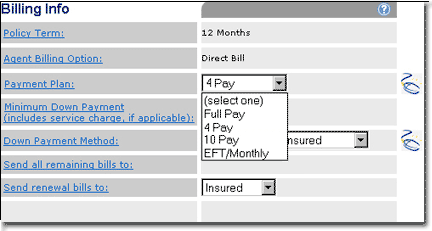
Click  .
.
If 4, 8, or 10 Pay is selected, the page is re-displayed with the Minimum Down Payment shown.
If EFT/Monthly is selected, the page is re-displayed with the Minimum Down Payment and EFT fields shown.
Select a Down Payment Method.
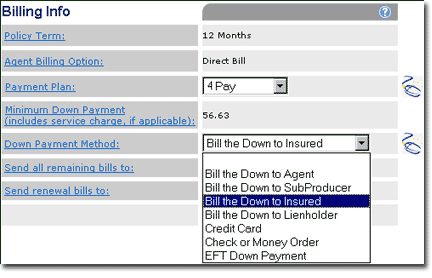

Click .
Depending on the Down Payment Method selected, the page is re-displayed and additional information, such as EFT or credit card information, must be entered.
|
If you select any of the Bill the Down... options and the application is awaiting approval, you will not be able to mail in a check/money order until you receive the policy number. Once the approval has been given for the policy, a policy number will be assigned. Then put the policy number, as well as the agency code found in the At a Glance section, on the check/money order and mail immediately into American Modern to be applied. If you change a Down Payment Method from Credit Card, Check/MoneyOrder or EFT to any of the Bill the Down... options, modernLINK automatically creates a memo, which is visible on the lower right of the screen, and display a message instructing you to review the memo. |
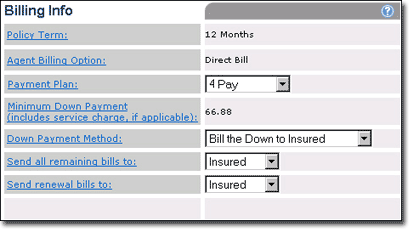
Select Insured or Lienholder in the Send all remaining bills to and Send renewal bills to lists.
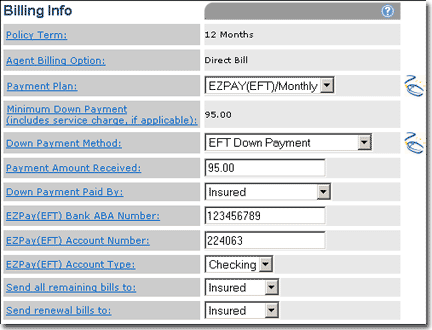
For the EFT/Monthly payment plan, enter the EFT information: Bank ABA Number, Account Number, Account Type, and Day of Month. Click EFT AUTHORIZATION FORM to print the form, have the applicant sign it and retain it with your records.
Do one of the following:
Click Next to review a summary of the quote.
Click Submit to submit the application.
If Next is clicked and an EFT payment option was selected, modernLINK attempts to verify the Bank ABA and Bank Account numbers with a third party service and if successful, the Summary page opens.
If Submit is clicked, the verification routine for either the EFT or Credit Card payment options is executed (if either option selected) and if successful, the quote is submitted.
|
If either EFT or Credit Card information fails verification, modernLINK issues a message. Ensure that you have correctly entered credit card or EFT banking numbers. If a number continues to fail, save the quote, contact the applicant for valid payment information and reenter the new payment information prior to submitting the quote. For EFT, when an application has been submitted for approval and money has been entered into the application, American Modern will not deduct any premium from the applicant's account until a policy is issued. |
Review the information in Submit the Quote to learn about quote statuses and processing.
