 |
    |
|
| |
 Termination of a Contract Holder or contract is performed by American Modern Licensing & Contracts personnel.
Termination of a Contract Holder is initiated when a decision is made to terminate a Contract Holder’s business relationship with American Modern. A sales rep or the Agency Contract Coordinator enters the initial termination information and the process is finalized by Licensing & Contracts.
Terminate a Contract Holder Tasks:
|
ACC/Sales |
|
|
ACC/Sales |
|
|
L&C |
Review the termination request, determine and input the renewal termination dates. |
|
L&C:
|
Manually issue a termination letter reflecting the requested termination. If a rollover is involved a Notice of Assignment letter will be created. |
|
AMS |
|
|
AMS |
To enter termination dates, reasons and options:
Search for and select the contract holder for updating in the AMS.
On the setup menu, click Product Authorization.
The product summary page opens.
On the product summary page, if terminating the CH, select all product check boxes. For a contract termination, select all products referenced in the contract. Click View/Edit.
On the product details summary page, select all product check boxes, then click Edit.
Enter the New Business Termination Date, then select the Termination Reason and Cancel Business Option.(Licensing & Contracts reviews all dates and enters renewal termination dates to ensure compliance with state regulations.) Repeat for every product.
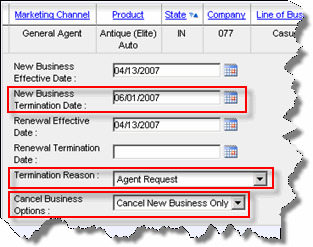
Click Save.
The product details summary page opens.
Enter termination comments.
To enter termination comments:
Click Comments.
The Comments form opens.
Enter processing notes for L&C, including rollover details (if business is to be rolled).
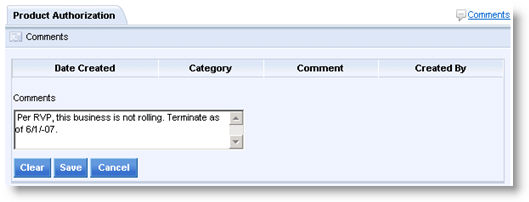
Click Save.
The Comments form closes.
Click Return to Menu.
The setup menu opens.
Click Submit for Authorization.
The termination request is submitted and L&C receives an e-mail alert. L&C then reviews the information and continues the process by reviewing state regulations and entering correct termination dates, if required.
To review and enter renewal termination dates (L&C only):
Search for and select the contract holder for updating in the AMS.
On the setup menu, click Account Management.
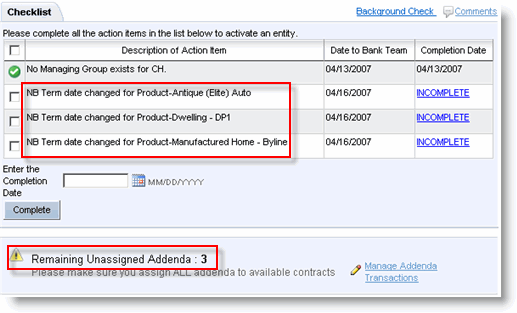
The Account Management page opens and displays action items and unassigned addenda transactions.
Review and edit Renewal Business Termination dates in Product Authority.
Follow the steps to group and assign the termination addenda transactions.
Click the contract in the Contract Processing section and enter the contract termination details.
To process appointment termination:
The AMS automatically requests appointment terminations via CT Corp according to state requirements.
For automatic notifications, the L&C inbox, sales rep and contract holder office e-mail address receive an e-mail confirming the termination. For paper states, ???
L&C Tech sends electronic copy of Appointment Termination acknowledgement to FileNet.
To synch product and entity termination: