 |
    |
|
| |
 The authority to process contract addenda transactions requires an American Modern Licensing & Contracts Profile Administrator security profile.
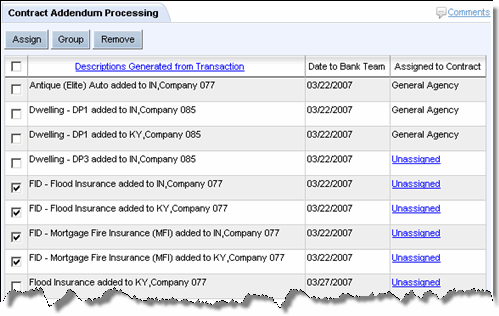
The Contract Addendum Processing page provides a place for you to assign, group, or remove transaction addenda.
To assign an addendum:
Select the checkbox of the Unassigned addendum to be assigned to a specific contract. If you select more than one, consider grouping the selections.
Click Assign.
The Contract Addendum Processing page opens.
Follow the steps to assign the addendum.
To group addenda:
Select the check box(-es) of the Unassigned addenda to be assigned to a specific contract. To select all addenda, click the topmost check box.
Click Group.
The Add to Group page opens.
Follow the steps to group the addenda.
Select the checkbox(-es) of the addenda to be removed from the Contract Holder.
Click Remove.
The Contract Addendum Processing page refreshes with the addenda or group(s) removed.
