 Generate a New QuoteGenerate a New Quote

To generate a new quote:
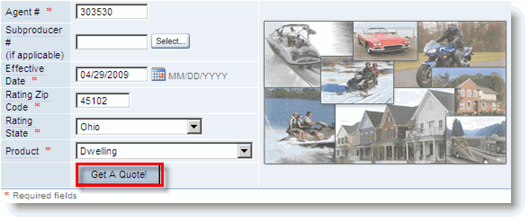
On the modernLINK home page, enter the quote data in the New Quote section and select Dwelling in the Product list.
|
Agent # |
The agent number used in the quote. If more than one is available, click Select to choose from the list. |
|
SubProducer # |
The subproducer number used in the quote. If more than one, click Select to choose from the list. |
|
Effective Date |
The Effective Date of the quote. |
|
Rating Zip Code |
The Zip Code of the risk location. |
|
Rating State |
The state of the risk location. |
|
Product |
The product to be quoted (Motorcycle). |
Click Get A Quote!
The Basic Information page opens.
Follow the steps to enter Basic Information.
|
|
If the current quote you are working on has been already been saved, you can save it as a new quote by selecting As New Quote from the Save menu in the page menu bar on the Basic Information page. This is useful for keeping records of different options you provide in quotes to an applicant. |

