 Unit InformationUnit Information

The Unit Information page provides a place for you to enter the following information:
|
|
If the complete VIN cannot be identified, the AO (All Other) Class (under the model name) identifies the minimum characters necessary to accept the unit. VINsure® then requires you to enter the model name and appropriate cc’s. If you receive an error message for a VIN you believe should be valid, contact your managing agent or American Modern's Home office to have an associate review the VIN information. A report is generated to list units in the AO Class. American Modern identifies the reason for the initial AO classification and then classifies the unit appropriately. See Coverages for more information on Class and Sub-Class. |
To enter Unit Information:
Complete the Unit Information form.
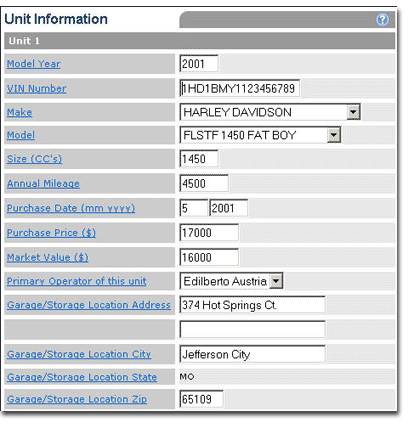

Unit Information includes the following information for each unit:
|
Label |
Description |
|
Model Year |
For the purpose of determining the age of the unit, the current model year shall change effective October 1 of each year, regardless of the actual introductory dates of the makes and models. The calculation used to determine unit age shall be Current Year minus Model Year. For example if the unit was manufactured in 2001, and is designated a “2001” model by the manufacturer, it will be four model years old on October 1, 2004 |
|
VIN Number |
The Vehicle Identification Number of the unit. |
|
Make |
Manufacturer of the unit. |
|
Model |
Indicates the unit model as designated by the manufacturer. |
|
Model Name |
Unit model name as designated by the manufacturer. |
|
Size (CC's) |
Engine size in cubic centimeters. |
|
Annual Mileage |
Indicates approximate number of miles the unit is driven each year. |
|
Purchase Date |
Date the applicant purchased the unit. |
|
Purchase Price ($) |
Price paid for the unit. |
|
Market Value |
Unit value as published in commonly used motorcycle valuation guides, such as NADA. |
|
Primary Operator of this Unit |
Name of the unit's Primary Operator, used for the premium computation. |
|
Is Garage/Storage Location Address the same as Unit 1? |
Yes or No. If No, address information is required for this unit. (Only appears for units other than 1) |
|
Garage/Storage Location Address |
Location street address of unit when not in use. |
|
Garage/Storage Location City |
Location city address of unit when not in use. |
|
Garage/Storage Location State |
Location state address of unit when not in use. This field is autofilled with garaging state from the Basic Information page. |
|
Garage/Storage Location Zip |
Location ZIP code of unit when not in use. |
Enter Coverage Eligibility information.
The Coverage Eligibility form provides a place for you to enter coverage eligibility information for each unit. For some units, the page is reloaded with additional questions.
To enter Coverage Eligibility information:
Complete the Coverage Eligibility form.
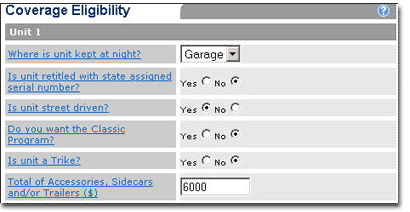
Coverage Eligibility information includes the following possible information. Some state-specific options are not listed.
|
Label |
Description |
|
Garaged In City Limits? |
Indicates if the unit is stored within the city limits when not in use (Kentucky only) |
|
Where is Unit Kept at Night? |
Indicates overnight storage: Garage, Street, Yard or Other. |
|
Is unit retitled with state assigned Serial Number? |
Indicates if the unit has been retitled with a state assigned serial number (VIN). |
|
Is unit street driven? |
Indicates if the unit is licensed for legal street operation. |
|
Do you want the Classic Program? |
The Classic Program is written on an agreed value basis. Specific eligibility requirements apply. |
|
Is unit a 3-Wheel Trike Conversion? |
Indicates if unit was converted from two- to three-wheel configuration ( trike conversion). |
|
Number of Wheels |
Number of wheels on this unit (for ATV's only)" 3,4,6 or Other. |
|
3-Wheel Trike Conversion Manufacturer |
Indicates the trike conversion manufacturer. |
|
Total of Accessories ($) |
Total value of accessories, sidecar(s) and trailer(s) over the limit automatically included when Comprehensive coverage is purchased (ordered on the Coverages page). Zero indicates no additional accessories coverage is desired. When Comprehensive coverage is purchased:
As an example, entering $6,000 is a request for $3,000 of additional coverage for a class A, B or C unit. $15,000 is the maximum allowable accessory coverage. Accessories include any item that is not factory standard equipment as reflected in the VIN, including items made by the manufacturer of the unit. |
Enter Lienholder/Other Insurable Interest information.
The Lienholder/Other Insurable Interest form provides a place for you to enter information about a unit lienholder, if one exists. A maximum of two lienholders can be added.
Designation of a lienholder is considered an acknowledgement that the entity named has a legal interest in the unit due to an installment sales contract or other valid security by the amount of the loss under the appropriate coverage.
To enter Lienholder information:
Complete the Lienholder form.
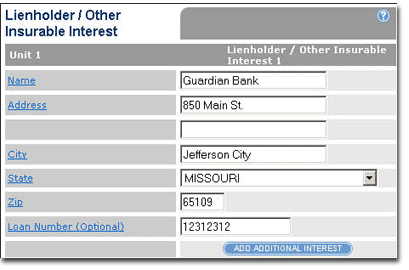
Lienholder/Other Insurable Interest information includes:
|
Label |
Description |
|
Name |
Lienholder/Other Insurable Interest name. Designation of a lienholder is considered an acknowledgment that the entity named has a legal interest in the unit due to an installment sales contract or other valid security by the amount of the loss under the appropriate coverage. |
|
Address |
Lienholder/Other Insurable Interest street address. |
|
City |
Lienholder/Other Insurable Interest address city. |
|
State |
Lienholder/Other Insurable Interest address state/country. |
|
Zip |
Lienholder/Other Insurable Interest address ZIP code. |
|
Loan Number |
Enter the loan number of the loan supplied to the applicant by the lienholder. |
Enter Previous Coverage information.
The Previous Coverage form provides a place for you to enter information for each unit's prior insurance.
To enter Previous Coverage information:
Complete the Previous Coverage form.
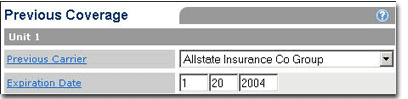
Previous Coverage information includes the following information for each unit:
|
Label |
Description |
|
Previous Carrier |
Indicates the name of the previous insurance carrier. |
|
Expiration Date |
Date that previous coverage expired or will expire. |
Click Next.
The Coverages page opens for the current unit.
Follow the steps to select coverages.

