 CoveragesCoverages

Coverage options depend upon the program and state in which the unit is being insured.
The Coverages page consists of the following forms:
The Class/Sub-Class section shows the Class and Sub-Class codes for the current unit. Class and Sub-Class are automatically assigned by VINsure® based upon a valid VIN.

Classes are as follows:
|
A |
Standard motorcycles with relatively low repair costs. |
|
B |
Units with higher repair costs due to accessories or value. Harley-Davidson or similar motorcycles with limited annual production. |
|
C |
A and B Class units with substantially increased value or repair costs. |
|
D |
All Off-Road Units. |
|
E |
Custom and Classic units (Custom cannot be insured via modernLINK). |
|
F |
Off-road multi-passenger units: low-speed electric carts, golf carts, utility vehicles, etc. |
Sub-Classes are:
|
AO |
All Other |
|
AS |
ATV Sport |
|
AT |
ATV Standard |
|
CL |
Classic |
|
CR |
Cruiser |
|
CU |
Custom |
|
DB |
Dirt Bike |
|
DP |
Dual-Purpose |
|
LP |
Limited Production |
|
MP |
Moped |
|
SC |
Scooter |
|
SD |
Standard |
|
SP |
Street Performance |
|
SU |
Super Sport |
|
ST |
Sports-Touring |
|
TR |
Touring |
|
DB |
Dirt Bike |
|
UL |
Utility |
The Mandatory Coverages form provides a place for you to enter or select dollar amounts in the event you wish to change the default required coverage values for the current quote.
To select Mandatory Coverages:
If desired, change the values in the Mandatory Coverages form or skip this step if you want to accept the defaults. Coverages listed depend upon the selected state and program.

Continue with the Optional Coverages form.

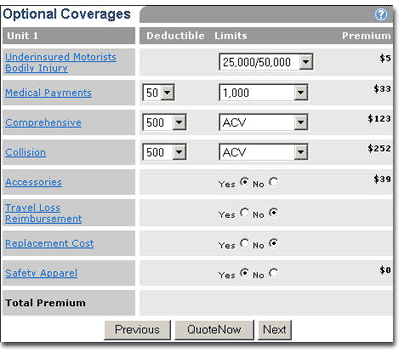
The Optional Coverages form provides a place for you to add additional coverages. Coverages listed depend upon the selected state and program. Accessories coverage requires Comprehensive coverage.
To select Optional Coverages:
Complete the Optional Coverages form.
The result is one of two possibilities:
If more than one unit, the next Unit Info page opens or...
The Coverage Summary page opens.
