 Client InformationClient Information

The Client Information form provides a place for you to enter some final required details about the applicant and, if required, the additional insured. You also indicate on this page that you have read the disclaimer to the applicant to approve ordering of the MVR.
To enter Client Information:
Complete the Client Info form.
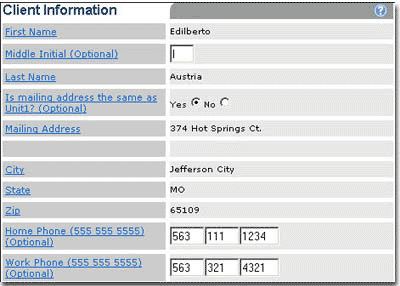
Client Information includes:
|
Label |
Description |
|
First Name |
Titled owner's first name carried over from Basic Information. |
|
Middle Initial |
The Titled owner's middle initial. |
|
Last Name |
Titled owner's last name carried over from Basic Information. |
|
Is mailing address same as location address? |
Indicates if the applicant's address is the same as the unit location address. If Yes, the remaining address information is auto-filled. |
|
Mailing Address |
Titled owner's address street number. |
|
Additional Name/Address Information |
An additional field for name or address information overflow. |
|
City |
Titled owner's address city. |
|
State |
Titled owner's address state/country. |
|
Zip |
Titled owner's address ZIP code. |
|
Home Phone |
Titled owner's home phone number. |
|
Work Phone |
Titled owner's work phone number. |
Do one of the following:
If an Additional Insured exists, complete the Additional Insured form.
Read the MVR Request disclaimer to the applicant.
The Additional Insured form provides a place for you to enter information about any other parties who have a financial interest in the unit(s).
To enter Additional Insured information:
Complete the Additional Insured form.
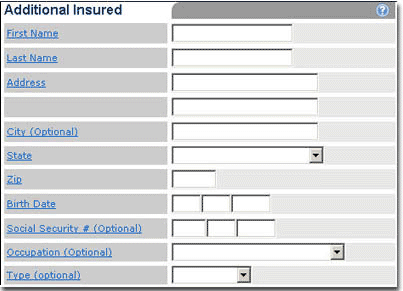
Additional Insured information includes:
|
Label |
Description |
|
First Name
|
The first name of the additional people who have a financial interest in the unit being insured. |
|
Last Name |
The last name of the additional people who have a financial interest in the unit being insured. |
|
Address
|
The street address of the additional people who have a financial interest in the unit being insured. |
|
City |
The address city of the additional people who have a financial interest in the unit being insured. |
|
State |
The address state of the additional people who have a financial interest in the unit being insured. |
|
Zip |
The address ZIP code of the additional people who have a financial interest in the unit being insured. |
|
Birth Date |
Birth date of the additional people who have a financial interest in the unit being insured. |
|
Social Security # |
Social Security number of the additional people who have a financial interest in the unit being insured. |
|
Occupation |
Occupation of the additional people who have a financial interest in the unit being insured. |
|
Type |
The type of the additional people who have a financial interest in the unit being insured. |
Read the MVR Request disclaimer to the applicant.
 |
Ensure that the MVR Request disclaimer is read to the applicant. |
To confirm the MVR Request disclaimer:
Select check box to indicate that you have read the disclaimer to the applicant to approve ordering of the MVR Request.
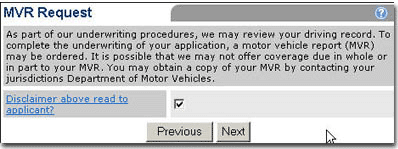
Click Next.
The result is one of two possibilities:
If an MVR has been ordered in states that support real-time processing, the MVR Summary page opens or...
The Billing Information page opens.
Follow the steps to review the MVR Summary or enter Billing Information.

