 |
    |
|
| |
The Unit page provides a place for you to enter the final required details about the unit and, if required, add an additional unit. A series of underwriting questions is also found on this form to help determine program eligibility. If more than one operator, you must assign or exclude operators on the Unit page.

 To edit a saved quote not yet in edit mode, first click Edit in the common action tool bar.
To enter Unit Information:
Complete the Unit form.

To add an additional unit click Add Another Unit and complete the form.
If only one operator, click Next.
The quote is saved and the Additional Interested Parties page opens.
Follow steps to enter the Additional Interested Parties information or skip to the Coverages page.
If more than one operator, assign the operators.
Any operator on a policy that only operates a single unit is assigned as the rated operator of that unit.
If more than one unexcluded operator and some or all of them only operate the same unit, then the highest rated of these operators is assigned as the rated operator of that unit.
After these have been assigned, operators of more than one unit on the policy are assigned – highest rated operator to highest rated unit that they operate, second highest to second highest, and so on, until all units are assigned a rated operator.
If there are more units than available operators, the highest rated operator is assigned as the rated operator to the remaining units.
Driver assignment is managed by the system. The assignments you make and shown on the page may not be the actual system assignments.
To assign or exclude operators:
Select the operator's role from the list.
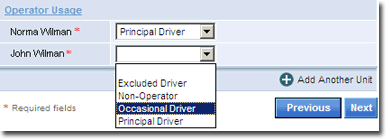
After all operators are assigned, click Next. Repeat the process for all units.
If all units completed, the Additional Interested Parties page opens.
Follow steps to enter the Additional Interested Parties information or skip to the Coverages page.
