
 Searching for a Quote
 modernLINK® offers several convenient search options that allow you to retrieve a previously entered quote. Saved quotes that have not been processed as policies or declined are visible in the system indefinitely.
You are able to retrieve only the quotes that you entered in modernLINK or that you are otherwise authorized to see based upon your Watercraft Security Profile .
To retrieve a quote:
On the page menu bar, click Retrieve.

The Search for Existing Quote page opens.
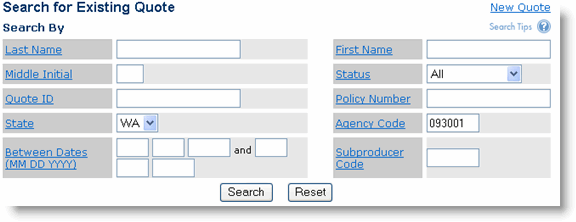
Enter the search criteria. The more search criteria you enter, the more specific the search becomes.
Possible search criteria fields are:
|
Field |
Description |
|
Last Name |
The applicant's last name. |
|
First Name |
The applicant's first name. |
|
Middle Initial |
The applicant's middle initial. |
|
Quote ID |
The system-assigned quote identifier. |
|
Status |
Status of the quote. |
|
Policy Number |
The policy number. |
|
State |
The state location of the unit. |
|
Agency Code |
The agency through which the quote was made. |
|
SubProducer Code |
Name of the sub-producer through which the quote was made. |
|
Between Dates |
The time span in which the quote was made. Specify a beginning and ending date in the format dd mm yyyy. |
Click Search.
The Search Results list opens (if you don't receive any results, expand your search by using fewer search criteria).
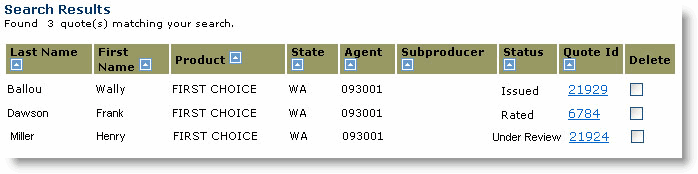
Click links in the Quote ID column to open, view and update quotes.
 You can sort the Search Results list by clicking a column heading.

