 |
    |
|
| |
The Commission Summary Detail page provides a place for you to add new, modify current or terminate current commissions for a product and state.
 Editing this information requires a Profile Administrator security profile.
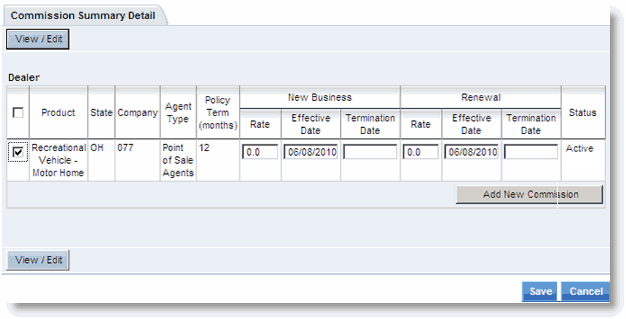
Commission details include:
|
Field |
Description |
|
Product |
The product to which the commission applies. |
|
State |
The state in which the associated product is written. |
|
Company |
The American Modern company through which the for the associated product business is written. |
|
Agent Type |
The Agent Type for the associated product. |
|
Policy Term |
The policy term in months for the associated product.. |
|
New Business Rate |
The new business commission rate for the associated product. |
|
New Business Effective Date |
The date on which the New Business commission goes into effect for the associated product. |
|
New Business Termination Date |
The date on which the New Business commission is terminated for the associated product. |
|
Renewal Rate |
The commission rate for renewal business of the associated product. |
|
Renewal Effective Date |
The date on which the Renewal Business commission goes into effect for the associated product. |
|
Renewal Termination Date |
The date on which the Renewal Business commission is terminated for the associated product. |
|
Status |
Status of the commission change request. |
To terminate commissions:
Select the Product check box for the commission(s) to be terminated, then click View/Edit.
Enter the New Business and Renewal Termination Dates.
Click Save.
The Commission Summary page opens.
Click OK.
The setup menu opens.
If desired, follow the steps to modify a current or add a new commission. Otherwise, click Submit for Authorization to submit the change.
The American Modern Licensing and Contracts department receives notification to change the commissions information for the licensed entity. Once made, changes are applied after overnight processing.
To modify existing or add new commissions:
To modify a commission, first follow the preceding steps to terminate it by entering the termination dates. Then follow the steps below to add the change as a new commission.
Select the Product check box for the commission(s) to be modified or added, then click Add New Commission.
The page refreshes with the product(s) in update mode.
Enter the new rate and date information.
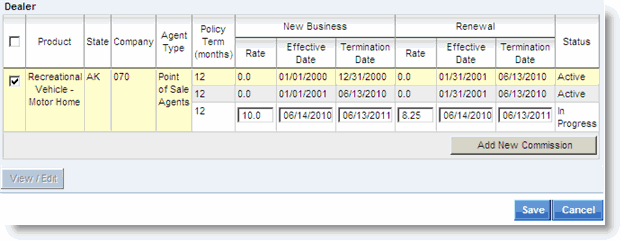
Click Save.
The Commission Summary page opens.
Click OK.
The setup menu opens.
Click Submit for Authorization to submit the setup/change.
American Modern Licensing and Contracts finalizes the change and changes are applied after overnight processing.
