 Client InfoClient Info

The Client Info page includes the following forms:
The Client Info form provides a place for you to enter some final required details about the applicant.
To enter Client Information:
Complete the Client Info form.
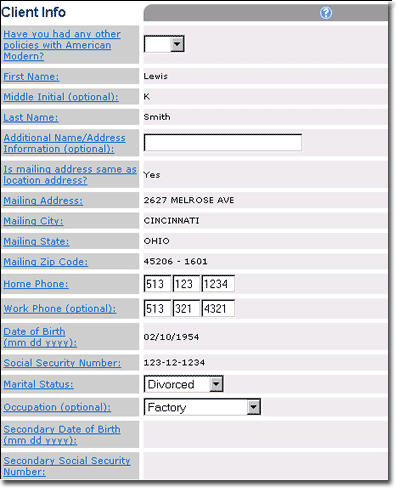
Client Info includes:
|
Label |
Description |
|
Have you had any other policies with American Modern? |
Indicates if applicant has had prior insurance with American Modern. |
|
First Name |
Applicant's first name. |
|
Middle Initial |
Applicant's middle initial. |
|
Last Name |
Applicant's last name. |
|
Additional Name/Address Information |
An additional field for name or address information overflow. |
|
Is mailing address same as location address? |
Indicates if the applicant's address is the same as the property location address. |
|
Mailing Address |
Applicant's address street number. |
|
Mailing City |
Applicant's address city. |
|
Mailing State |
Applicant's address state/country. |
|
Mailing Zip Code |
Applicant's address ZIP code. |
|
Home Phone |
Applicant's home phone number. |
|
Work Phone |
Applicant's work phone number. |
|
Date of Birth |
Applicant's date of birth. |
|
Social Security Number |
Applicant's social security number. |
|
Marital Status |
Indicates applicant's marital status. |
|
Occupation |
Indicates the applicant's occupation. |
|
Secondary Date of Birth |
Spouse/secondary date of birth. |
|
Secondary Social Security Number |
Spouse/secondary social security number. |
Do one of the following:
If a lienholder for the property exists, complete the Lienholder form.
If an Additional Insured exists, complete the Additional Insured form.
Follow the steps to select the Agent Billing Option.

The Lienholder form provides a place for you to enter information about a property lienholder, if one exists. A maximum of two lienholders can be added.
Designation of a lienholder is considered an acknowledgement that the entity named has a legal interest in the home due to an installment sales contract or other valid security by the amount of the loss under the appropriate coverage.
To enter Lienholder information:
Complete the Lienholder form.
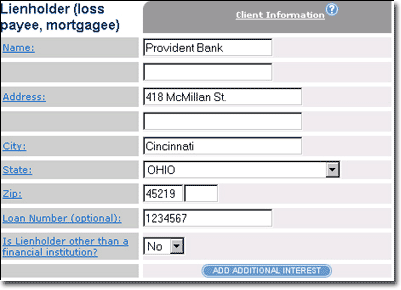
Lienholder information includes:
|
Label |
Description |
|
Name |
Lienholder's name. Designation of a lienholder is considered an acknowledgment that the entity named has a legal interest in the home due to an installment sales contract or other valid security by the amount of the loss under the appropriate coverage. |
|
Address |
Lienholder's street address. |
|
City |
Lienholder's address city. |
|
State |
Lienholder's address state/country. |
|
Zip |
Lienholder's address ZIP code. |
|
Loan Number |
Enter the loan number of the loan supplied to the applicant by the lienholder. |
|
Is lienholder other than financial institution? |
Select Yes to indicate that the lienholder is NOT a financial institution. |
Do one of the following:
If an Additional Insured exists, complete the Additional Insured form.
Follow the steps to select the Agent Billing Option.
The Additional Insured form provides a place for you to enter information about any other parties who have a financial interest in the property.
To enter Additional Insured information:
Complete the Additional Insured form.
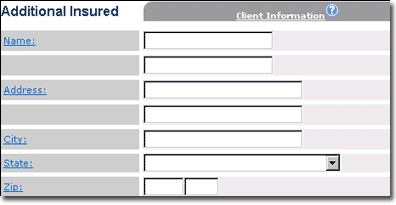
Additional Insured information includes:
|
Label |
Description |
|
Name
|
The name of the additional people who have a financial interest in the property being insured. |
|
Address
|
The street address of the additional people who have a financial interest in the property being insured. |
|
City |
The address city of the additional people who have a financial interest in the property being insured. |
|
State |
The address state of the additional people who have a financial interest in the property being insured. |
|
Zip |
The address ZIP code of the additional people who have a financial interest in the property being insured. |
Follow the steps to select the Agent Billing Option.
